If you have ever applied for a government scholarship or a Direct Benefit Transfer scheme and found yourself staring blankly at your bank passbook wondering “where is my money?” — you are not alone. Every year, millions of Indians face this exact situation. And every year, the answer lies in one place: PFMS.
Whether you are a student chasing your scholarship, a farmer waiting for PM-KISAN funds, or a government official managing disbursements, this guide covers everything you need to know about PFMS, PFMS Login, the PFMS portal, pfms.nic.in, and PFMS DBT — in plain, simple language.
What is PFMS?
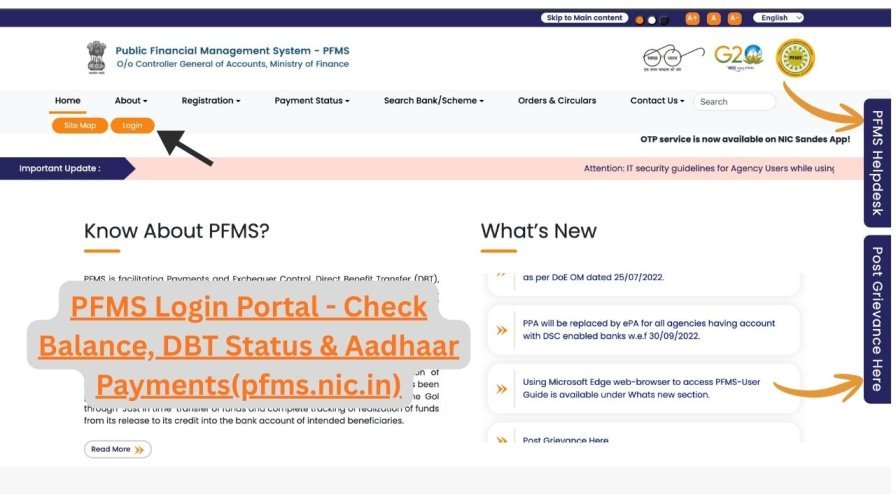
PFMS full form is Public Financial Management System. It is a web-based platform developed and maintained by the Office of the Controller General of Accounts (CGA), Department of Expenditure, Ministry of Finance, Government of India.
Before PFMS existed, tracking where government money went was nearly impossible for ordinary citizens. There was no real-time visibility. Funds would pass through multiple agencies, and by the time they reached the beneficiary — if they reached at all — there was no clear record.
PFMS changed all of that.
Think of it this way: if your government scholarship or subsidy were a courier parcel, PFMS would be the tracking system that shows you exactly where it is at every point — from the moment it left the ministry’s hands to the second it landed in your bank account.
Today, PFMS powers the disbursement of funds across 300+ central government schemes, tracking billions of rupees every single day.
PFMS Portal — pfms.nic.in at a Glance
| Detail | Information |
|---|---|
| Portal Name | Public Financial Management System (PFMS) |
| Official Website | pfms.nic.in |
| Launched By | Government of India, Ministry of Finance |
| Managed By | Office of Controller General of Accounts (CGA) |
| Primary Purpose | Real-time tracking and management of government fund disbursements |
| Services for Students | Scholarship status check, payment tracking, grievance filing |
| Services for Officials | Fund management, payslip download, scheme monitoring |
| Contact Email | helpdesk-pfms@gov.in |
| Helpline Number | 011-23343860 |
Important: Always access PFMS only through the official URL — https://pfms.nic.in. The “.nic.in” domain confirms it is a verified Government of India website. Do not trust any third-party or look-alike sites.
PFMS Login 2025-26 — Step-by-Step Guide
Before we dive into this, there is one thing you must understand clearly:
Regular beneficiaries — students, farmers, pensioners — do NOT need to log in to PFMS to check payment status. The PFMS Login is exclusively for authorised government officials and agencies.
If you are trying to check your scholarship or DBT status, scroll down to the “Know Your Payment” section. That feature requires no login whatsoever.
PFMS Login for Government Officials
If you are an authorised government user, here is how to log in:
Step 1: Open your browser and go to the official PFMS portal — https://pfms.nic.in
Step 2: On the homepage, click the “Login” button located at the top-left corner of the screen.
Step 3: On the login page that appears, select the current financial year (2025-26 or 2026-27 as applicable).
Step 4: Enter your department-issued Username and Password in the respective fields.
Step 5: Complete the CAPTCHA verification displayed on the screen. Type the characters exactly as shown — this is case-sensitive.
Step 6: As of 2025, PFMS uses Multi-Factor Authentication (MFA). After entering your password, you will receive a One-Time Password (OTP) on your registered mobile number. Enter this OTP.
Step 7: Click “Sign In” to access your dashboard, which includes pending approvals, fund utilisation reports, payment authorisations, and scheme-level summaries.
PFMS Registration for New Government Users
If you are a newly appointed government official who needs access to the PFMS portal, here is how registration works:
Step 1: Visit pfms.nic.in and click the “Registration” button on the homepage.
Step 2: From the dropdown menu, select the category that applies to you (e.g., state government agency, central agency, etc.).
Step 3: Fill in all the required details in the registration form — name, designation, department, official email ID, and mobile number.
Step 4: Submit the form. Note that credentials are not auto-generated. Your application goes through manual verification by your department’s nodal PFMS officer, who then issues your login credentials.
This process is in place to ensure that only verified, authorised individuals gain access to government financial management systems.
PFMS Login Security Instructions (Very Important)
PFMS handles sensitive financial data of millions of citizens. If you are a registered government user, the portal has strict security guidelines:
- Never share your PFMS login credentials with colleagues, assistants, or anyone else — regardless of seniority.
- Do not share digital certificates associated with your account.
- Disable your account immediately upon transfer, retirement, or resignation. Inactive accounts with active credentials are a security risk.
- Monitor all SMS and email alerts from PFMS carefully. Report any suspicious activity to helpdesk-pfms@gov.in without delay.
- Never log in from public computers or shared networks without VPN protection.
How to Check PFMS Payment Status — No Login Required
This is the section most students and beneficiaries are looking for. The good news: you do not need any account or password to track your payment on the PFMS portal.
The feature is called “Know Your Payment” and it is available right on the homepage of pfms.nic.in.
There are three methods to check your status:
Method 1: Search by Bank Account Number (Most Recommended)
This is the simplest and most commonly used method.
- Visit https://pfms.nic.in
- Hover over the “Payments” tab in the top menu and click “Know Your Payments”
- Select “Search by Account Number” from the options
- Choose your bank name from the dropdown list
- Enter your bank account number — you will be asked to enter it twice for confirmation
- Solve the CAPTCHA displayed on screen
- Click “Search”
What you will see: A complete transaction history of all government payments credited to that account, including the payment date, scheme name, exact amount, and a unique Payment ID (PID) for reference.
Method 2: Search by Aadhaar Number
If your bank account is linked to your Aadhaar, you can use this method.
- On the “Know Your Payments” page, select “Search by Aadhaar Number”
- Enter your 12-digit Aadhaar number
- Select the bank linked to that Aadhaar
- Complete the CAPTCHA and click “Search”
This method is especially useful if you have recently changed banks or have multiple bank accounts, as it fetches payment records tied to your Aadhaar identity regardless of which account the money went to.
Method 3: DBT Real-Time Status Tracker (For Specific Applications)
When you want to know the exact processing stage of a pending payment:
- On the PFMS homepage, click the “DBT Status Tracker” link (visible under the Payments section)
- Enter your Application ID (available from NSP or your scheme’s official portal) or Beneficiary Code
- Provide your registered bank account number
- Solve the CAPTCHA and click “Track”
The system displays the complete payment journey in stages: Validated → Approved → Payment Initiated → Success / Failed
If a payment fails, the reason is also displayed — such as account number mismatch, IFSC error, or Aadhaar seeding issue — so you know exactly what to fix.
Understanding PFMS Payment Status Messages
When you check your PFMS status, you will see one of the following messages. Here is what each one actually means and what you should do:
| Status Message | What It Means | Your Next Step |
|---|---|---|
| Payment Initiated | Funds have left the ministry/department and are on their way to your bank | Wait 24–72 working hours |
| Payment Successful | Money has been credited to your account | Check your bank passbook or app |
| Under Process / Pending | Payment is approved but queued for transfer | Check again after 3–5 working days |
| Account Validation Failed | Your name, Aadhaar, or IFSC code doesn’t match bank records | Contact your institute or scheme nodal officer |
| Payment Rejected | Application did not meet eligibility criteria | Contact the respective scholarship/scheme helpline |
| Awaiting Approval | Institute has verified your documents; waiting for government-level approval | No action needed; this is a normal stage |
Practical Note: After “Payment Initiated” appears on PFMS, the money typically reflects in your bank account within 3 working days. During high-volume months like March and September, it can take up to 7 working days.
PFMS Scholarship Tracking 2026
Every year, crores of students across India receive educational scholarships through schemes linked to the National Scholarship Portal (NSP) — and every single one of those payments flows through PFMS.
Popular Scholarships Disbursed via PFMS
- Pre-Matric Scholarship (for SC/ST/OBC students)
- Post-Matric Scholarship (for SC/ST/OBC students)
- Central Sector Scholarship Scheme (CSS)
- Merit-cum-Means Scholarship for Minorities
- National Means-cum-Merit Scholarship (NMMS)
- State Government Educational Scholarships
- Top Class Education Scheme
How to Track Your Scholarship Payment Step by Step
Step 1: When you first apply on NSP, note down your Application ID carefully. This is your reference number throughout the process.
Step 2: After submitting your application, wait for an approval notification via SMS or email.
Step 3: Once approved at the institute level, visit pfms.nic.in
Step 4: Go to “Know Your Payment” and search using either your bank account number or NSP Application ID.
Step 5: Check status every 2–3 days. The moment it changes to “Payment Initiated”, your money is on its way.
Typical Scholarship Timeline (For Reference)
| Stage | Approximate Timeframe |
|---|---|
| Application Submitted | Week 1 |
| Institute Verification | Week 2–3 |
| District/State Level Approval | Week 4–6 |
| PFMS Payment Initiated | Week 7–8 |
| Bank Account Credited | Within 3 working days of initiation |
PFMS Helpdesk and Contact Information
If you have tried everything and still cannot resolve your issue, here is where to get official help:
| Contact Method | Details | Availability |
|---|---|---|
| Official Website | https://pfms.nic.in | 24/7 |
| Helpline Number | 011-23343860 | Monday–Friday (office hours) |
| Email Support | helpdesk-pfms@gov.in | Response within 2–3 working days |
| Postal Address | O/o Controller General of Accounts, Ministry of Finance, 3rd & 4th Floor, Shivaji Stadium Annexe, Connaught Place, New Delhi – 110001 | — |
| In-Portal Grievance | Available under “Grievance” section on PFMS homepage | No login required for beneficiaries |
Pro Tip: When emailing the helpdesk, always include your full name, scheme name, application ID or bank account number, and a clear description of the issue. Vague emails take much longer to resolve.
Frequently Asked Questions (FAQs)
Q1. Is PFMS and NSP the same thing?
No. NSP (National Scholarship Portal) is where you apply for scholarships. PFMS is where those scholarships are paid. Think of NSP as the application window and PFMS as the payment window. The two systems are integrated, meaning once NSP approves your application, PFMS handles the actual money transfer.
Q2. I am a student. Do I need to register on PFMS?
No. Students do not register on PFMS directly. Your details are automatically synced from NSP or the respective scheme portal once your application is approved. You only need the PFMS portal to track your payment.
Q3. How long does PFMS take to credit money after “Payment Initiated”?
Typically 1–3 working days under normal circumstances. In peak months like March (year-end) or September (mid-year), it may take up to 7 working days.
Q4. Can I check PFMS payment status from my mobile phone?
Yes. The PFMS portal is accessible from any browser on Android or iOS. Simply open your browser, visit pfms.nic.in, and use “Know Your Payment” as you would on a desktop.
Q5. My scholarship payment failed. Will it be sent again automatically?
It depends on the reason for failure. If it was an account validation failure, you need to update your bank details through your institute first. Once corrected, the payment is typically re-initiated by the scheme authority in the next processing cycle.
Q6. What is the difference between PFMS and CPSMS?
They are the same system. CPSMS (Central Plan Scheme Monitoring System) was the earlier name. It was renamed PFMS to reflect its broader mandate of managing all public finances, not just central plan schemes.
Q7. Is the PFMS portal safe to use?
Yes. As a Government of India portal under the .nic.in domain, pfms.nic.in uses secure encryption. Always verify the URL before entering any personal details. The official site does not ask for your bank password or OTP at any point — if a website does, it is a scam site.